Isn't a database just a bigger table? No — and "database" isn't one thing either.
A table is a list. A database is a system.
A table is a list: one row per item, every row the same columns, each row standing on its own. For a list of same-shaped things it is the best tool there is, and nothing below replaces it for that job.
A database is not a bigger list. It is a system that keeps lists and adds four things a spreadsheet cannot. Each one fixes something you have fought in a tracker.
1. It refuses bad data. In a tracker, one row says "In progress", the next says "in-progress", and the filter misses one. The same vendor is spelled three ways. An action is still owned by someone who left in March. A database keeps one list of allowed statuses, one record per vendor, one record per person, and refuses an entry that doesn't match. The drift you spend Friday afternoons cleaning up cannot start.
2. It remembers what belongs to what. An action item comes from a meeting, is owned by a person, and closes a client's request. In a spreadsheet you type the meeting date and the owner's name into two columns and hope they are spelled the same everywhere. In a database, "action 41 came from Tuesday's meeting" is a stored fact, readable from either end: open the meeting and see its actions; open the person and see their actions across every meeting and every project.
3. You ask it; you don't scroll it. "Everything overdue that one consultant owns, across all my projects, sorted by client" is one question. No filter to set up, no tab to maintain, no copy to go stale. Every dashboard, report or chart is a saved question, asked again each time you open it.
4. Everyone works on the same record, under the same rules. A shared spreadsheet lets several people type at once; it does not stop two people entering the same item twice, or one person overwriting the status the other just set. A database applies its rules to every hand and records who changed what and when. An AI assistant is simply one more hand, bound by the same rules.
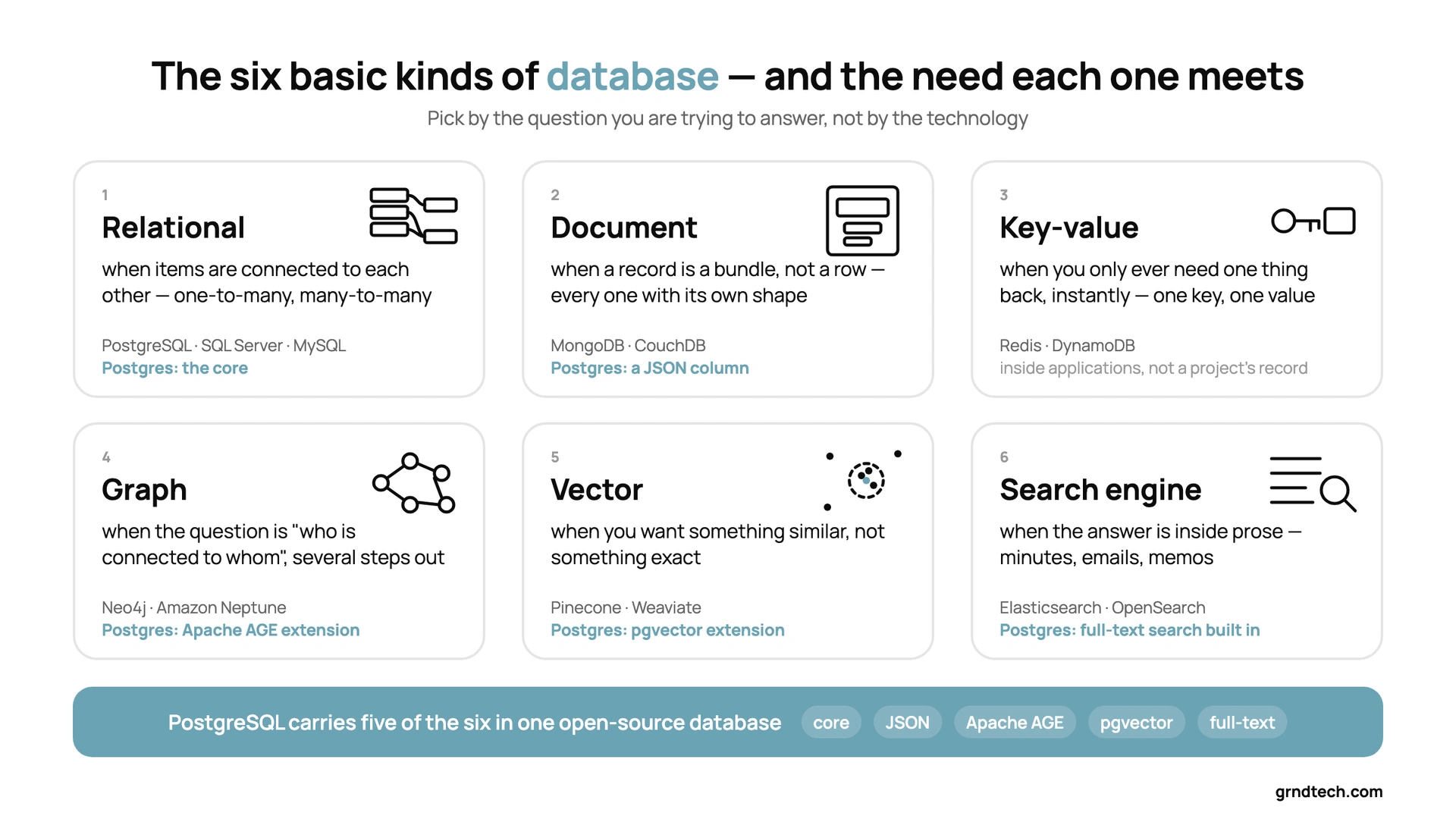
The six basic kinds of database — and the need each one meets
No kind of database was invented for its own sake. Each exists because some information has a shape a plain list handles badly. Here are the six you will hear about, each introduced by the need it answers.
1. Relational — when items are connected to each other. The need: one thing belongs to another, and many things share many others. A client has many projects; each project has many invoices: one-to-many. A person works on several projects, and each project has several people: many-to-many. A relational database is many clean lists plus the connections between them, stored as data, so "every open invoice for this client" and "everyone who has worked with this person" are questions, not spreadsheets someone builds. This is the web I keep describing: lists, plus the connections between them. Its query language, SQL, is what asking a database a question has meant for forty years. Examples: PostgreSQL, SQL Server, MySQL, SQLite. When someone says "database" with no adjective, this is the kind they mean.
2. Document — when a record is a bundle, not a row. The need: every record has its own internal shape. Think of a résumé. Each one has jobs; each job has dates and a few achievements; some have certifications and some have none. No spreadsheet with one row per person can hold that, which is why you have never seen one that worked. A document database stores the whole bundle as one record and still lets you reach inside it: "everyone who has worked in Ontario" is a question. Examples: MongoDB, CouchDB. Importantly, modern relational databases can hold these bundles inside an ordinary column, so in practice you rarely need a separate system.
3. Key-value — when you only ever need one thing back, instantly. The need: look up one value by one key, millions of times, with no other questions asked. A user's preferences, a login session, the last calculated answer. Examples: Redis, DynamoDB. You meet it inside applications, never as a project's record; it is here because you will hear the name.
4. Graph — when the question is "who is connected to whom, several steps out." The need is easiest to see on LinkedIn. Your connections are one step away; their connections are your second degree; theirs, your third. "How am I connected to this person?" is a graph question. In project work: who approves the approver? If this drawing changes, which sheets reference it, and which sheets reference those? Isn't that just a relational database? Conceptually, yes: both store items and connections. The difference is how they store them. A relational database keeps every connection as a row in a connections table, so each step outward means looking that table up again: once for your connections, again for theirs, again for theirs. Fine for two or three steps; slow when the chain is long. A graph database stores each item together with its own list of connections, so following a chain is like clicking from profile to profile instead of searching the directory at every step, and its query language is written in terms of paths. Examples: Neo4j, Amazon Neptune; PostgreSQL gains the capability through the Apache AGE extension. Honest guidance: a relational database with a connections table covers nine professional cases in ten; reach for graph when long chains are your daily question.
5. Vector — when you are looking for something similar, not something exact. The need: "have we dealt with something like this before?" The proposal you wrote last year that resembles the one due Friday; the meeting where someone already answered this question, in different words. A vector database stores a numerical fingerprint of each item's meaning and finds the items whose fingerprints are closest. This is the kind the AI hype tells you to buy first. It is genuinely useful, and it is the last one you need, because it cannot tell you a status, a date or an owner. Examples: Pinecone, Weaviate; or pgvector, which adds the capability inside a relational database.
6. Search engine — when the answer is inside prose. The need: find every minute, email and memo that mentions a term, ranked by relevance. A search engine stores documents and builds the index that makes that fast. Examples: Elasticsearch, OpenSearch. Strictly, many would call full-text search a capability rather than a kind of database, because most relational databases include a capable version; the industry rankings count search engines as their own category, and the need is real enough to earn a place here. Not where facts live; where you find the document the fact came from.
(There are more: wide-column stores for enormous write volumes, time-series for sensor readings, columnar warehouses for analytics over billions of rows. Those are for data engineers, not for a project's record.)
If you have to pick one, start with Postgres
If this leaves you with one question, which database to start with, my answer is PostgreSQL. It is open source under a permissive licence, and the project has committed to staying that way. It is also unusually flexible: the relational core, nested records in a JSON column, full-text search built in, similarity search through the pgvector extension, and graph queries through the Apache AGE extension, all inside one database. For most applications a professional will ever need, it is the flexible choice that is also free. To read more about Postgres, see the next article.