The most talked-about AI agent of the year, OpenClaw, keeps its entire memory in plain markdown files — simple .md text files that an AI can read and rewrite.
Here's the news most professionals scrolled past: that same file format now lives inside Microsoft 365. OneDrive and SharePoint rolled out native markdown editing this year — web in April, mobile in July. No plugin, no download. (I only noticed while searching for an online markdown editor; it turns out I no longer need one.)
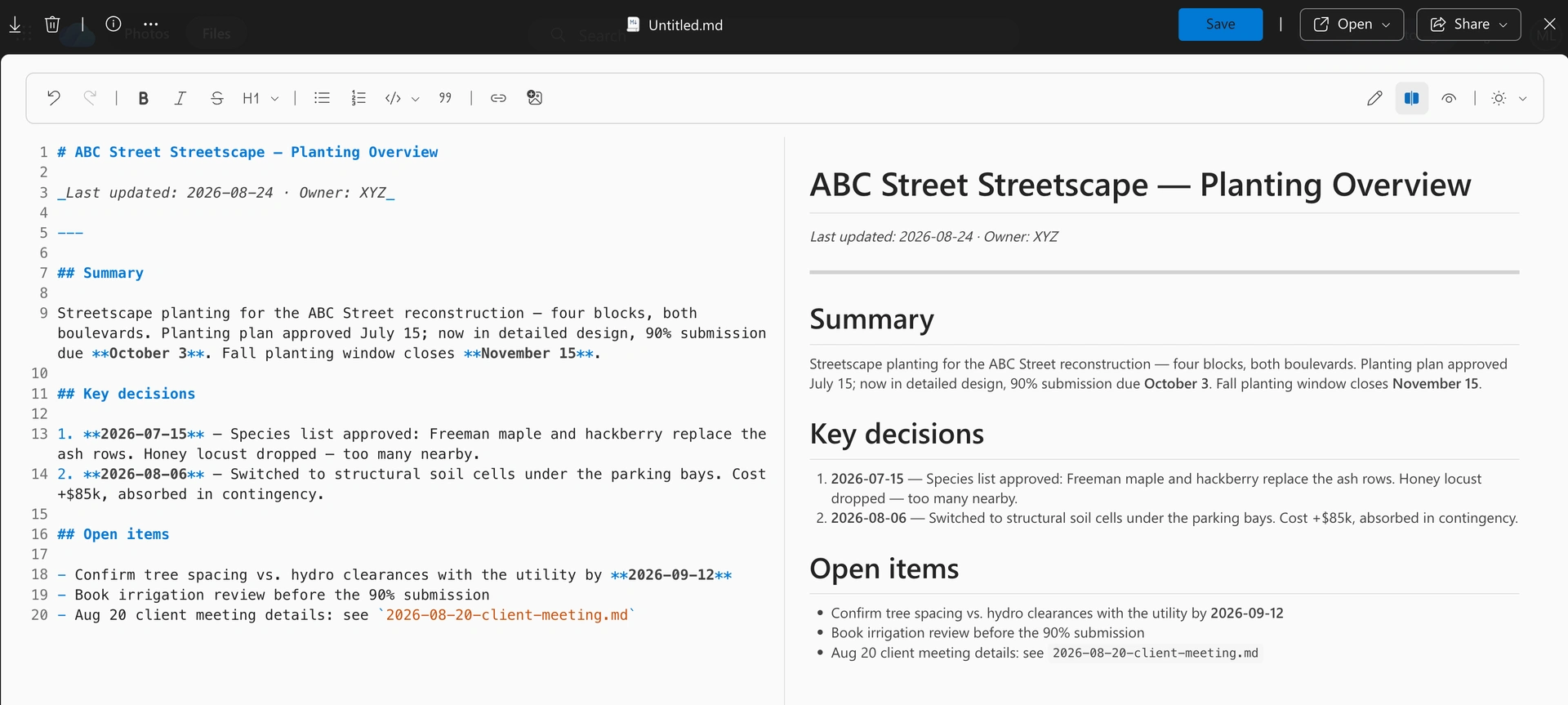
Put those two facts together and you get something genuinely useful: you can give Copilot a project memory using nothing but tools your firm already approved. This article shows why this humble format matters so much to AI, what Word and PDF files actually are under the hood, and a simple four-step system to build that memory — no special tools, no AI agent expertise required.
My Obsidian confession
I first met markdown years ago when I tried Obsidian, the note-taking app. Honestly, I bounced off. Files full of # and ** looked like a programmer thing, and I went back to Word.
What I couldn't see at the time: I was looking at the format that would become the native language of AI tools. Every answer ChatGPT, Copilot, or Claude writes to you is composed in markdown before your chat window renders it. If you bounced off markdown too, this article is for you.
What markdown actually is — in 60 seconds
Markdown is plain text with a handful of readable symbols: # marks a heading, **bold** marks emphasis, - starts a list, and pipes draw a table.
# ABC Street Streetscape — Status
**Phase:** Detailed Design

## Milestones
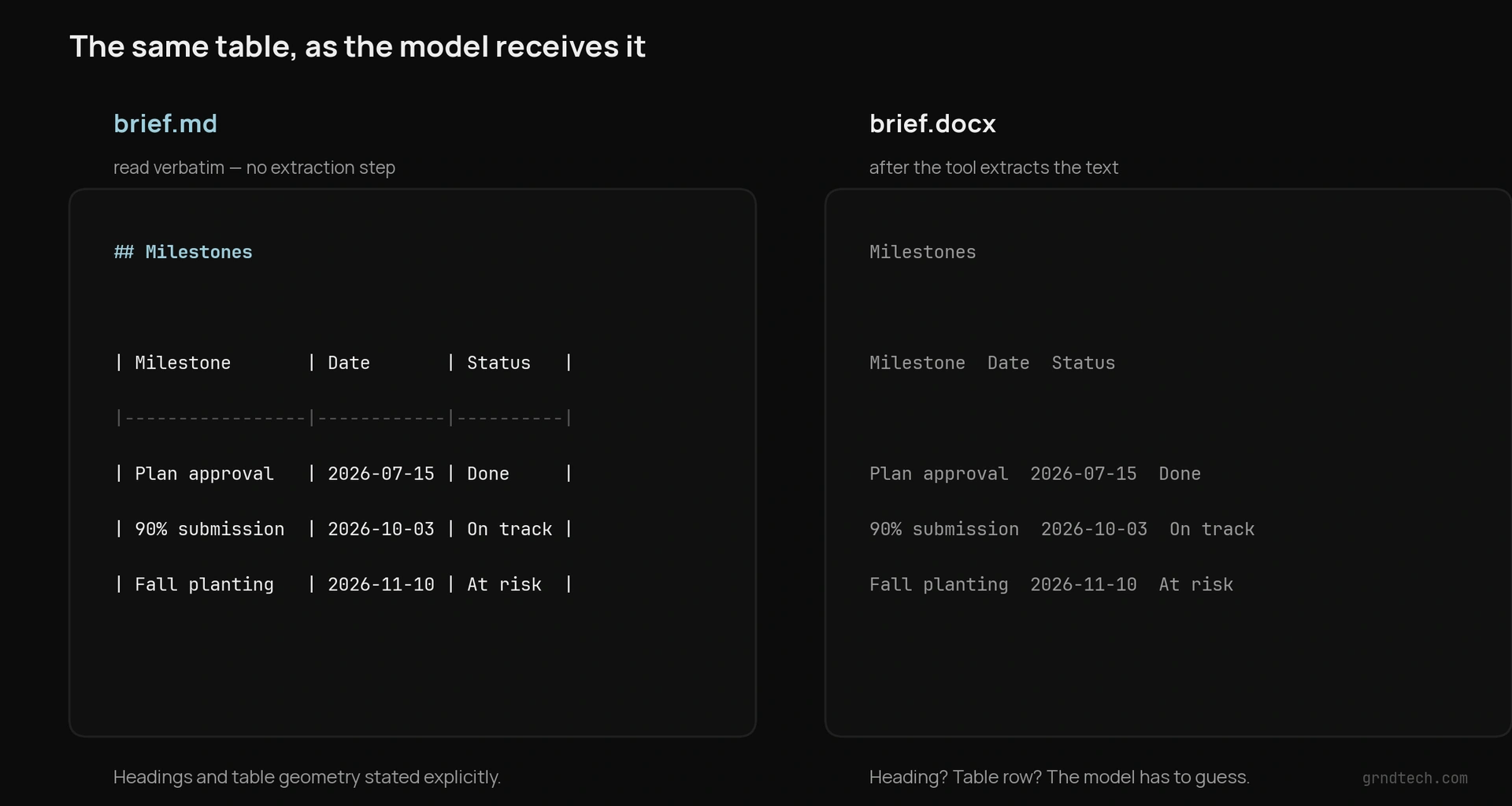
| Milestone | Date | Status |
|---|---|---|
| 90% submission | 2026-10-03 | On track |
That's the whole trick. It is simultaneously human-readable and machine-readable — there is no hidden formatting layer between what you see and what a program (or an AI) sees.
Markdown wasn't invented for AI. John Gruber, working with Aaron Swartz, created it in 2004 with one guiding principle: the raw text should be publishable as-is — readable as a document in its own right, borrowing conventions people already used in plain-text email (asterisks for emphasis, dashes for lists). That principle made it the house format of the developer web — every GitHub README, every Stack Overflow answer, every developer forum post is markdown — which is to say, it saturated the text AI models learned from. So when chat models arrived, they already spoke it. (And markdown is older than .docx itself, which only arrived with Office 2007.) Twenty years on, the AI age has made markdown's founding idea — a document that needs no renderer — the most valuable property a file format can have: the same file is the source, the display, and the thing a machine can safely rewrite.
What the other formats actually are
To understand why that matters, it helps to know what the familiar formats really are under the hood.
.txt is raw characters, nothing else. Readable everywhere, but structure-blind: a heading is just a line like any other.
.docx is not a document — it's a zip archive. Rename any Word file to .zip and open it: inside you'll find a folder tree of XML files describing fonts, themes, styles, printer settings, and, somewhere in word/document.xml, your actual words wrapped in tags.
.pdf is a set of print instructions: glyphs positioned at coordinates on a page. It records where characters sit, not how the text reads — there's no paragraph, table, or heading inside — so an AI's extractor has to reconstruct the reading order by guesswork, and tables and multi-column layouts are the usual casualties. PDFs are unavoidable — contracts and invoices arrive as PDF whether you like it or not, and AI tools have gotten good at reading them — but an AI can't maintain one. Treat PDFs as raw material your context files are condensed from, never the format you keep context in.
.html carries real structure, but it's structure addressed to a browser: every heading pays for opening and closing tags, and real-world pages add classes, styles, and layout scaffolding on top.
.md carries the same structure as HTML — headings, lists, tables, links — at nearly the price of plain text. And since it is still plain text, everything that works on .txt works on .md — search, compare, version — with one upgrade: the structure itself becomes searchable. Search a folder of .md files for ## and you get every section heading; search for a date and you get the decisions made that week. In a .txt file, there's nothing for the search to grab.
The experiment: one project brief, five formats
Talk is cheap, so I tested it. I wrote a one-page project status brief — summary, key people, a milestone table, dated decisions, open items — and saved the identical content in all five formats. Then I measured what each format weighs and what an AI model actually receives, using the same tokenizer. (Tokens are the units AI models read and bill by.)
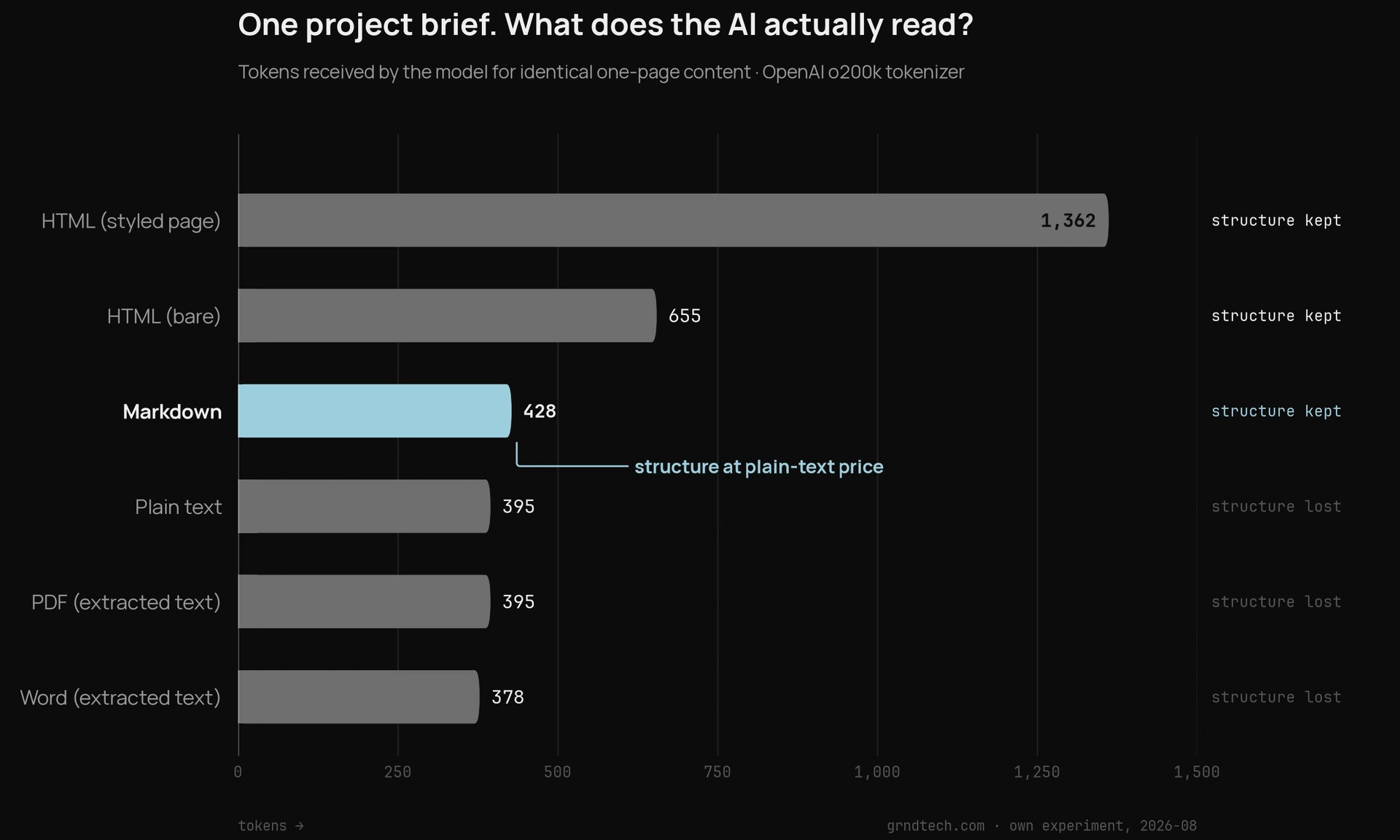
The raw numbers — shown in markdown, naturally:
| Format        | File on disk | What the AI reads  | Tokens | Structure preserved?             |
| ------------- | ------------ | ------------------ | ------ | -------------------------------- |
| Markdown      | 1.7 KB       | the file, verbatim | 428    | Yes — headings, table, numbering |
| Plain text    | 1.6 KB       | the file, verbatim | 395    | No                               |
| HTML (bare)   | 2.2 KB       | the file, verbatim | 655    | Yes, at 1.5× the tokens          |
| HTML (styled) | 3.8 KB       | the file, verbatim | 1,362  | Yes, at 3.2× the tokens          |
| Word (.docx)  | 37.7 KB      | extracted text     | 378    | Mostly lost in extraction        |
| PDF           | 2.4 KB       | extracted text     | 395    | Mostly lost in extraction        |
Three honest findings — including one that surprised me:
1. Word's overhead is astonishing, but the AI never sees it. My 37.7 KB .docx unzips to 830 KB of XML across 17 files — roughly 500× the size of the markdown holding the same content. The word/document.xml file alone would cost 2,412 tokens to read raw, 5.6× the markdown. But no AI tool feeds a model raw docx: the tool extracts the text first. Which leads to the real issue.
2. After extraction, Word is not more expensive — it's poorer. The extracted Word text actually came to slightly fewer tokens than the markdown (378 vs. 428). Where did the savings come from? The structure. Heading levels, table geometry, list numbering — flattened into undifferentiated lines the model has to re-guess. So if you've attached a Word file to Copilot and gotten a fine answer, you weren't imagining it; for one small file, extraction works well enough. The loss shows up later, at scale: when many files compete for the model's limited attention, the documents that state their structure explicitly are the ones that survive summarization, retrieval, and long contexts intact.
3. HTML is where tokens really burn. The same content as a styled web page cost 3.2× the tokens. This is why AI practitioners convert web content to markdown before feeding it to models.
And the finding that matters most isn't in the table: markdown is the only format where the file on disk and what the AI reads are the same thing. No extraction step, nothing lost, structure included — at plain-text prices.
The real reason: AI can maintain a markdown file
Reading is only half the story. Here's the difference you'll feel in the first week, not at scale: an AI can rewrite the words in a Word document just fine — it's the formatting where things break down. Language models are text-in, text-out; they generate plain text, and something else has to reapply Word's formatting layer afterward. Even Copilot working inside Word shows the seams: rewritten sections can lose heading styles and character formatting, tables come back with a default style and split merged cells, and list items get re-created as plain paragraphs.
Markdown has no separate formatting layer to break. A model's native structured output is markdown — so when Copilot updates your status file, adds a decision, or re-sorts a table, what it writes is the finished file. Nothing to convert, nothing to fix afterward.
A context system only works if it's cheap to keep current. Markdown is the read/write format of the practice: the AI drafts it, you skim it, the AI updates it next week. That loop is what the other formats can't do cleanly.
Why maintain your own context files at all?
You might ask: why not just attach the relevant Word docs, decks, and emails to each chat? For a single question, that's fine. As a way of working, it has three problems.
Raw documents are written for humans and full of noise — boilerplate, dead versions, the one relevant page buried in a 40-slide deck. You re-gather and re-attach them every single chat, starting from zero each time. And when two documents conflict — the March plan versus the July revision — the model has to guess which one is current.
A maintained context folder is different in kind, not just format. It's distilled: only what matters. It's current: updated after each meeting, with conflicts resolved by you, once. And it's compounding: it gets better every week, while attachments reset to zero every chat.
You're not managing files. You're managing what the AI believes about your project.
And the longer and larger the project, the more this compounds. On a complex multi-year program, the context outlives everything else — chat histories expire, tools get replaced, teammates rotate off. The file that records why the 2024 decision rules out this year's shortcut is institutional memory, and a maintained context folder is the cheapest one you will ever build.
This matters especially in Microsoft 365, where a regular Copilot chat still forgets your project between sessions. Microsoft's answer is Copilot Notebooks, now rolling out: a persistent workspace whose whole point is keeping a project's reference files in one place — documents, pages, meeting notes — so Copilot stays grounded in the same curated set across chats. As of this month, markdown files count as reference sources too. Either way, when your context lives in files you own, you're covered: it works in today's Copilot chat, it plugs into Notebooks, and it will plug into whatever your firm deploys next.
This isn't a workaround I invented, either. OpenClaw — the open-source AI agent everyone was talking about this year — stores its entire memory as plain markdown files: a curated MEMORY.md for durable facts, plus dated daily notes for working detail, distilled upward over time. (It does build a search index over those files for fast recall — but the index is disposable and rebuilt from the files. The files are the memory.) The pattern below is the same memory architecture, scaled to an everyday professional's workflow — the difference is that OpenClaw runs the read-and-update loop automatically, and here you trigger it. Your OneDrive folder is the agent's brain, minus the agent.
Two tiers: memory plus details
One design point before the steps. AI models have a context window — a hard limit on how much they can read at once — so you can't hand over everything. But a folder of nothing-but-summaries fails the other way: when the model needs the specifics of the August 20 meeting, they'd better exist somewhere.
The answer is two tiers, the same split every serious AI memory system uses:
- Tier 1 —
overview.md. Short, always shared. What the AI should always know: current status, key people, decisions with dates, open items. One page, hard limit. - Tier 2 — detail files. Meeting summaries, decision records, reference notes —
2026-08-20-client-meeting.md,decisions.md. Not aggressively summarized; they keep the specifics. Shared only when relevant, findable because the file name says what's inside.
The overview points down: "full details in decisions.md." Summaries index the details — they don't replace them. That's how you respect the context window without losing information.
The framework: Create → Condense → Use → Refresh
One rule across all four steps: you don't write these files — Copilot does. Your job is to ask, review, and save.
1. Create. Make one OneDrive folder per project (e.g. ABCStreet-AI-Context). Then ask Copilot to draft a single overview.md — the "read me first" — from a template like this:
# [Project name] — Overview
**Last updated:** [date] · **Owner:** [you]

## Summary
[3–5 sentences: what this project is and where it stands.]

## Key people
- [Name — role — what they care about]

## Decisions
1. **[date]** — [decision + one line of why. Old options now obsolete? Say so.]

## Open items
- [item — owner — due date]

## Details
- [topic] → see [file-name.md]
2. Condense. Ask Copilot to do the writing. After a project milestone, try: "Review the attached emails and documents about [project]. Summarize the current status, decisions made (with dates), and open items as markdown I can save as a .md file. Use headings and bullet lists. Flag anything contradictory." Save the result into the folder — you can now create and edit .md files right in OneDrive.
3. Use. Start each Copilot session by pointing it at your context folder instead of typing the background from memory: the "Attach cloud files" option in Copilot Chat accepts an entire OneDrive or SharePoint folder, or you can select just overview.md plus the one relevant detail file. If your firm has Copilot Notebooks, add the folder as a reference source once and it grounds every conversation in that notebook.
4. Refresh. After every meeting or major discussion: "Here is my current overview.md and my notes from today's meeting. Update the overview — revise the status, add new decisions with today's date, and update open items. Keep it under one page. Output the full updated file." Save it over the old one. Two minutes, and your project memory is current.
Do you need this? Two questions: Are you spending too much time typing background context every time you talk to Copilot? Do you want high-quality, accurate context feeding Copilot so you get its best output? If either lands, start this week: create one .md file in OneDrive, and let Copilot fill it. Your future AI agent will thank you.