Open the tracker. Scroll through a hundred columns to the row. Now find the drawing that backs it up: a multi-gigabyte tree of 100-plus folders, where dozens of files are named nothing but 51705.pdf — the folder they sit in is the only thing that says what they are. Open one, squint at the title block, Alt-Tab back to the spreadsheet, compare, repeat. The work demands precision — descriptions, design references, dates that feed statutory deadlines — and the checking never stops. By any honest count: hundreds of clicks a day, producing nothing but the ability to look at two things at once.
The condition every office team knows
The tracker is Excel, of course. In most offices Excel is the tracker, the schedule, the register — the habit is sticky for good reasons: everyone can open it, nobody needs training, nobody needs permission. But the moment several teams work the same records, the habit frays. Each team needs its own slice of the truth, so someone builds a private tab with lookup formulas, someone else saves a copy "just for this review" — and every copy starts going stale the moment it's saved. Add a drawing set that lives in folders three levels away from the spreadsheet that references it, and you have the daily condition this tool was built inside.
Written out plainly, the requirements — a large and growing data set, columns that keep expanding, each team needing its own custom, focused filter, one source of truth — don't describe a spreadsheet at all. They describe a database.
I didn't even go online to look for online software this time — the need is too specific. And it turned out nothing new was needed anyway: no install required, no additional procurement budget. A browser is already on every computer, and Python is free and easily accessible — often already on a work machine, and otherwise a quick download away. Python even brings its own database.
Three tries at the "right" answer
The first try was the closest thing to a database inside the corporate-approved toolbox: a SharePoint List. Genuinely capable — versioning, real field types, per-team views, so each team could filter its own slice without private tabs or linked copies. It never caught on, and not because it's a bad product. Everyone is busy, and busy people reach for what they already know and can adapt to immediately. Excel has decades of that familiarity; the List doesn't. A single source of truth that people don't open isn't yet a source of truth — it's a second place where the data goes quiet.
So, give the List a better front end? Halfway through came the honest realization: what needed fixing was the interface, and that isn't fixed by moving the data. Store and interface are separate problems — we'd been solving the wrong one.
The deciding observation was about AI. The assistant bundled with the corporate office stack isn't permitted agentic operations on the List — it cannot read and write it at will. And it can't edit a local file either, Excel included: it can read one and rebuild a new copy for download, and that's the ceiling. So the automation path doesn't run through the corporate AI at all. It runs through files and scripts: a spreadsheet in a folder that Python can read, check, and build around. Excel stays the master; everyone keeps the tool they already trust; the database moves underneath, where nobody has to look at it.
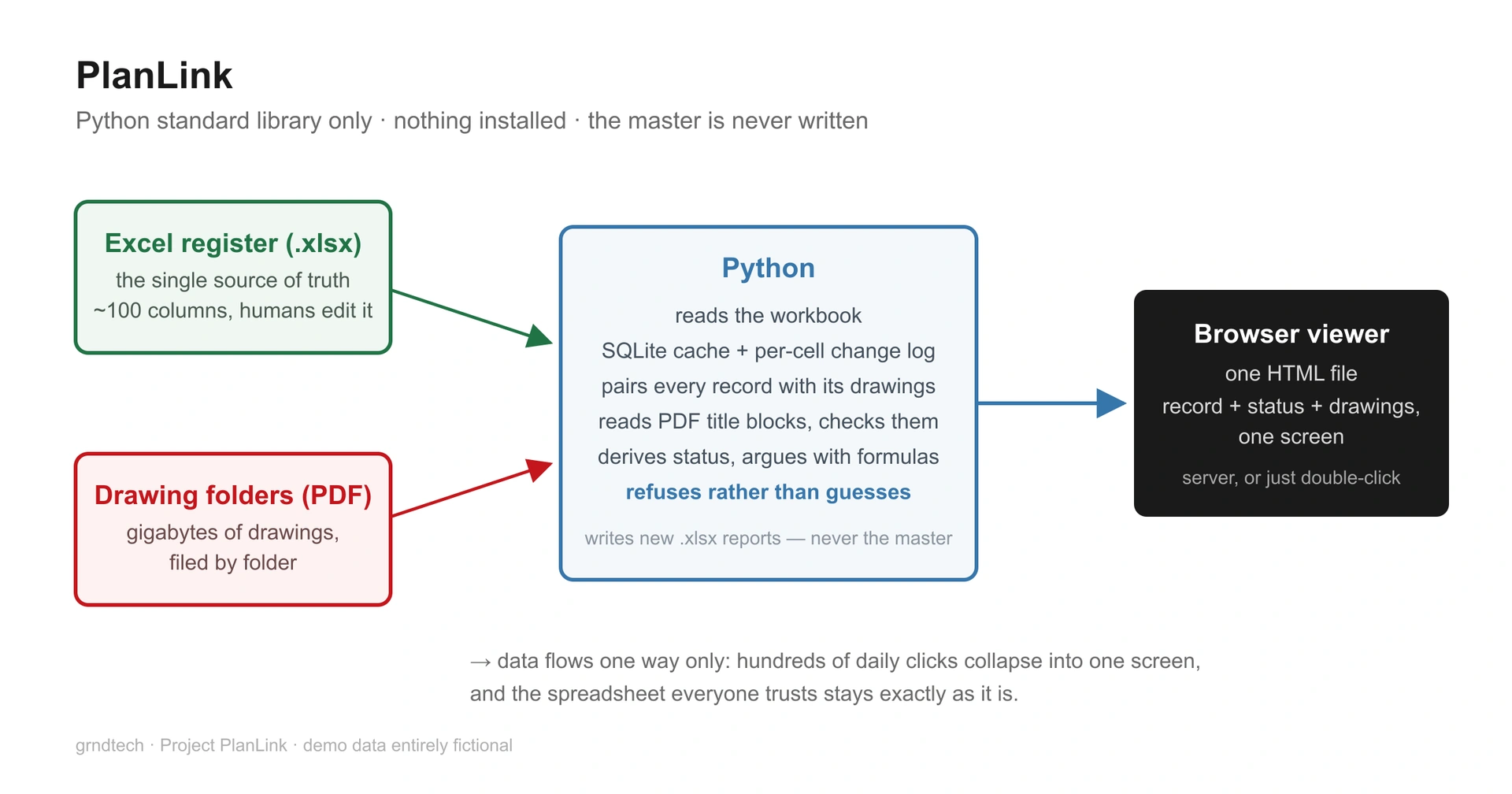
What the free stack actually did
This section has one purpose: to show that Python is a hidden — and free — power tool within reach of almost every computer, and that AI is the key that finally lets an everyday working professional, with no developer background, turn it. Leveraging compute used to belong to software developers. It doesn't anymore.
Everything below is Python standard library — no additional dependencies required.
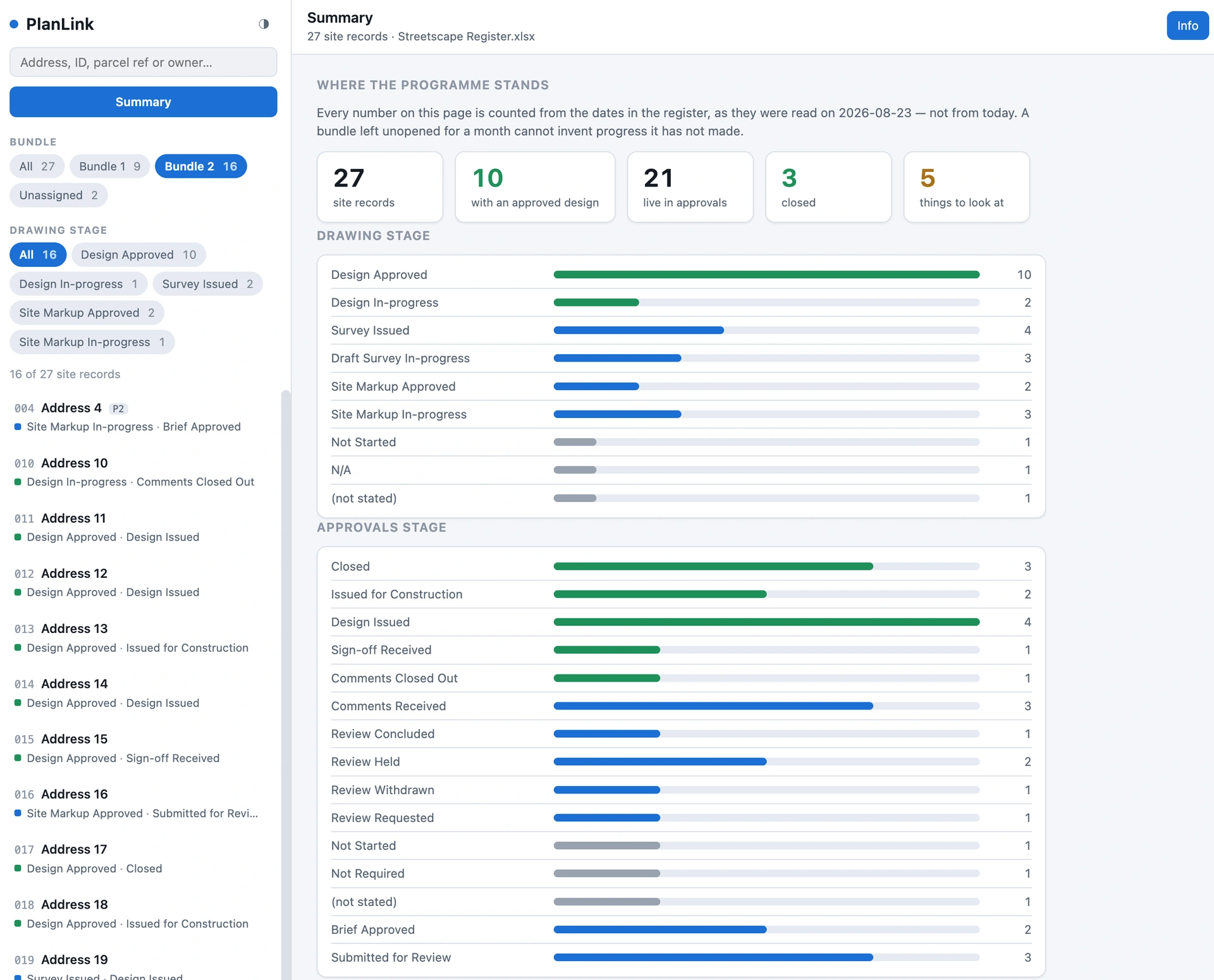
- It reads and writes Excel files. An
.xlsxis a zip full of XML, andzipfileandxml.etreehave shipped with Python for twenty years. Reading handles shared strings, styles, and the subtle part — a date in xlsx is just a float, and the cell's style is the only thing that says otherwise. And the reports it produces come back out as real workbooks, live formulas and cached values included, because Excel is what the team opens. - It discovers your columns instead of declaring them. Columns are found on every import, matched by header text and never by position. Add a column and it appears. Rename one and its history carries across. Delete one and nothing it ever held is lost.
- A per-cell change log. Every refresh diffs the workbook against the database; any cell that moved gets a record — the old value, the new value, and the timestamped run that saw it. Formatting churn is canonicalized away, so the log records edits, not re-saves. That's the audit trail Excel doesn't keep.
- SQLite — the database the job needed, already on the machine. One file, no server to set up, and it ships inside Python itself. The workbook stays the single source of truth: the database is a cache, so deleting it is a non-event.
- It derives status from the dates — then argues with the spreadsheet. Two parallel status ladders (drawings and contract process), re-implemented in Python, and every refresh reports where the derived answer and the workbook's own formulas part company.
- It pairs every record with its drawings. Plans are classified by the folder they were filed in — a filename is a label somebody typed; a folder is a statement. Out of gigabytes of archive and working files, the packager selects the 164 MB that is current. Not compression — selection.
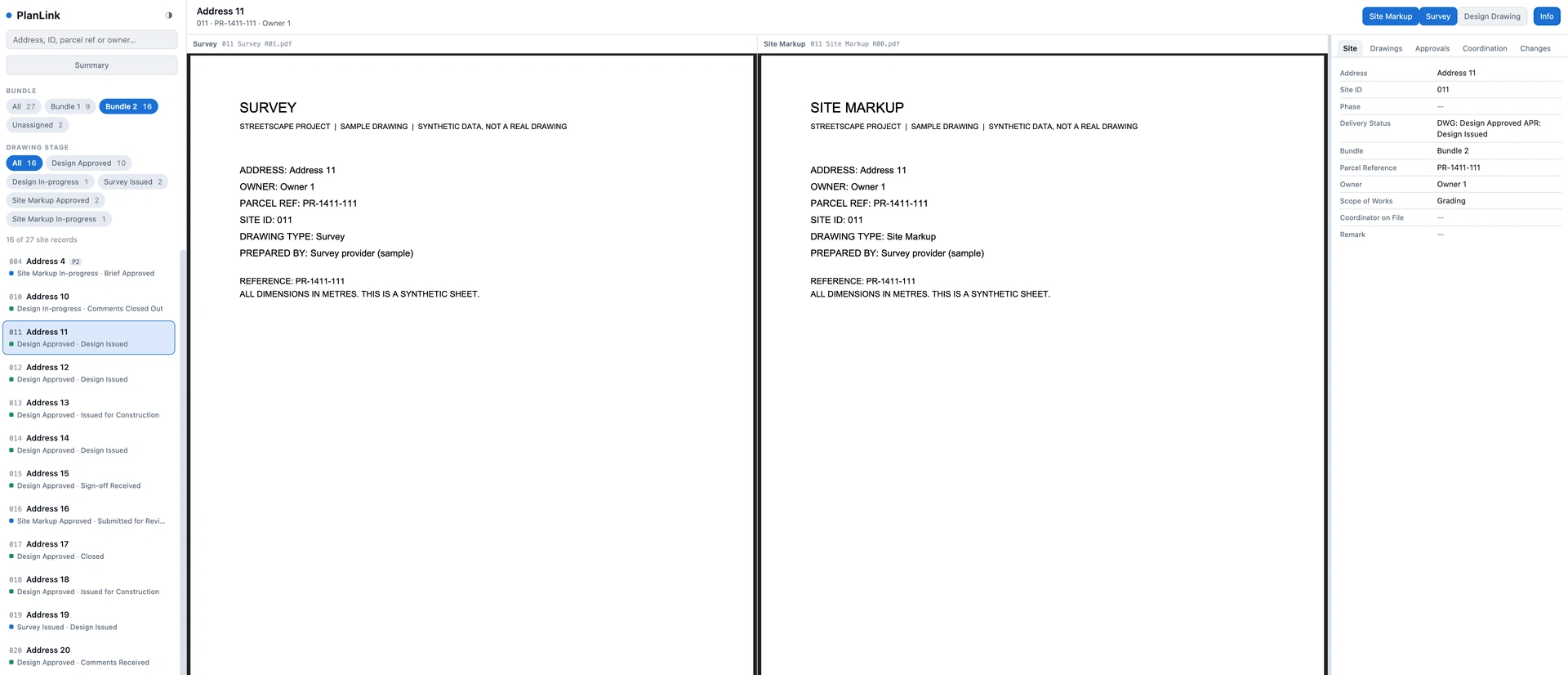
- It reads the drawings. A ~200-line PDF text extractor pulls each title block — decompressing stream chains, recovering reading order from text coordinates — and checks the address and parcel reference against the tracker. Mismatches and missing drawings are reported separately, because they need different people to do different things. When a drawing can't be read, it says why.
- Batch filing — no more open one, save one, repeat. Drop new drawings — or saved Outlook
.msgemails — into an inbox folder, and it proposes where each one belongs, naming which signal it matched on so a human judges evidence rather than a verdict. (A.msgis a small filesystem in a file; Python parses it by hand.) Nothing moves without an explicit apply. - One screen, no app, no server. The viewer is a single HTML file with its data embedded as script assignments — the one design choice that lets it open by plain double-click, because
file://blocks afetch()but not a script tag. With Python present,http.serverserves it properly and adds a read-only JSON API. On Windows there's a.batfor the first double-click. - And it's not a solo app. The data and drawings live in a shared SharePoint library, so the team syncs them like any other project folder — everyone opens the same viewer on their own machine, refreshed data and all. (The scripts themselves stay on local disk: SharePoint's sync safety policy doesn't carry script files, so the tool lives locally while the record syncs.) Where people write, the design is one writer per file, which means the sync engine can never manufacture a conflict copy.
- It refuses rather than guesses. An ambiguous record, a duplicated row, an import that changes a quarter of the cells — each stops with a message naming the file and the row. An import that fails quietly and lets the next step run on stale data reports success while being wrong.
That last principle was paid for. Early on, a misfiled 505.pdf matched the wrong record and silently stole another record's drawings — and the first fix blanked the right record entirely. The durable fix wasn't a patch; it was a collision check that has reported zero ever since.
The toolbox is the point
AI agents do their work by running scripts. The LLM is just the brain; Python is its hands. Watch closely how an agent works through its chain of thought in a ChatGPT or Claude session — the real work happens when it writes and runs a little script. An agent can write that script on the fly, but that costs time and tokens on every run, and the quality is unstable — the same request produces a different script tomorrow. A tool generated once, tested, and kept is deterministic, instant, reusable — exactly right for stable, repetitive workflows.
That's what this project really produced. Not one app — a toolbox: an Excel reader-writer, a self-contained mini database, a PDF text extractor, an HTML packager, each one something any AI agent can call reliably instead of reinventing badly — or that runs entirely on its own, no AI subscription required, which is a benefit in itself. The toolbox compounds. Before subscribing to the next AI tool or online software, look at what's already on the computer — and make what you build with it permanent.
Ship
PlanLink is free and open source (Apache 2.0) at github.com/maxli552/planlink — pure standard library, Python 3.8+, nothing to install. It ships with a complete fictional demo so the viewer renders the moment you clone it — and it's built to be adapted with an AI coding assistant: the repo carries a CLAUDE.md/AGENTS.md map written for exactly that. Point Claude Code, Cursor, or Codex at it, describe your own tracker, and let the agent reshape the ladders and columns to fit. A team configuration is possible too: everyone runs the viewer, while the workbook's named editors stay the only writers. It's for anyone tracking a portfolio in Excel with the documents scattered in folders — properties, permits, assets, contracts, equipment. Honest limitations: one human writes the workbook (by design), it is a viewer and a checker rather than an editor, and the public PDF reader is deliberately small.
MinuteKit, a sibling tool following the same philosophy — meeting agendas and minutes generation — can be read here.
PlanLink is provided as is, without warranty of any kind: test it against a copy of your own data before you rely on it, and before any commercial use. It reports what your spreadsheet and your drawings say; it is not a substitute for a qualified review. See the terms of use.