Every recurring meeting has an action log, and every action log lives in one of two states: high-maintenance, or forgotten. Keeping it current is real clerical work — after every meeting someone opens last time's minutes, copies the agenda table, deletes the closed items, renumbers what's left, retypes the action register, and chases the owners and due dates that changed. Do that faithfully and it costs twenty careful minutes every cycle. Skip it once — a busy week, a holiday, a handover — and the log quietly stops being true. Nobody decides to abandon an action log. It just decays, and by the time anyone notices, rebuilding it means re-reading months of minutes.
The setup is similar to Project PlanLink: no install required, no additional procurement budget needed — minutes stay in Word, on the template, because that is what minutes are. So: Python standard library, again.
A database approach to minutes — without the database
Look at what a meeting series actually is: items with identities, actions with owners, due dates and statuses, all evolving meeting to meeting. That's a data set, and the maintenance pain comes from managing a data set by hand-editing prose. The fix is a database approach — but PlanLink taught the lesson already: a "better" place to store data that people won't open just creates a second place where the data is wrong.
So MinuteKit keeps no database at all. The .docx files are the record. Every run re-parses the minutes in the meeting folder; the structure inside them — item numbers, action tables — is the schema, and the script is the query engine. Everything else — agendas, the action register, the summaries — is derived and disposable. Nothing to migrate, nothing to drift out of sync with the documents people actually read, edit, and file.
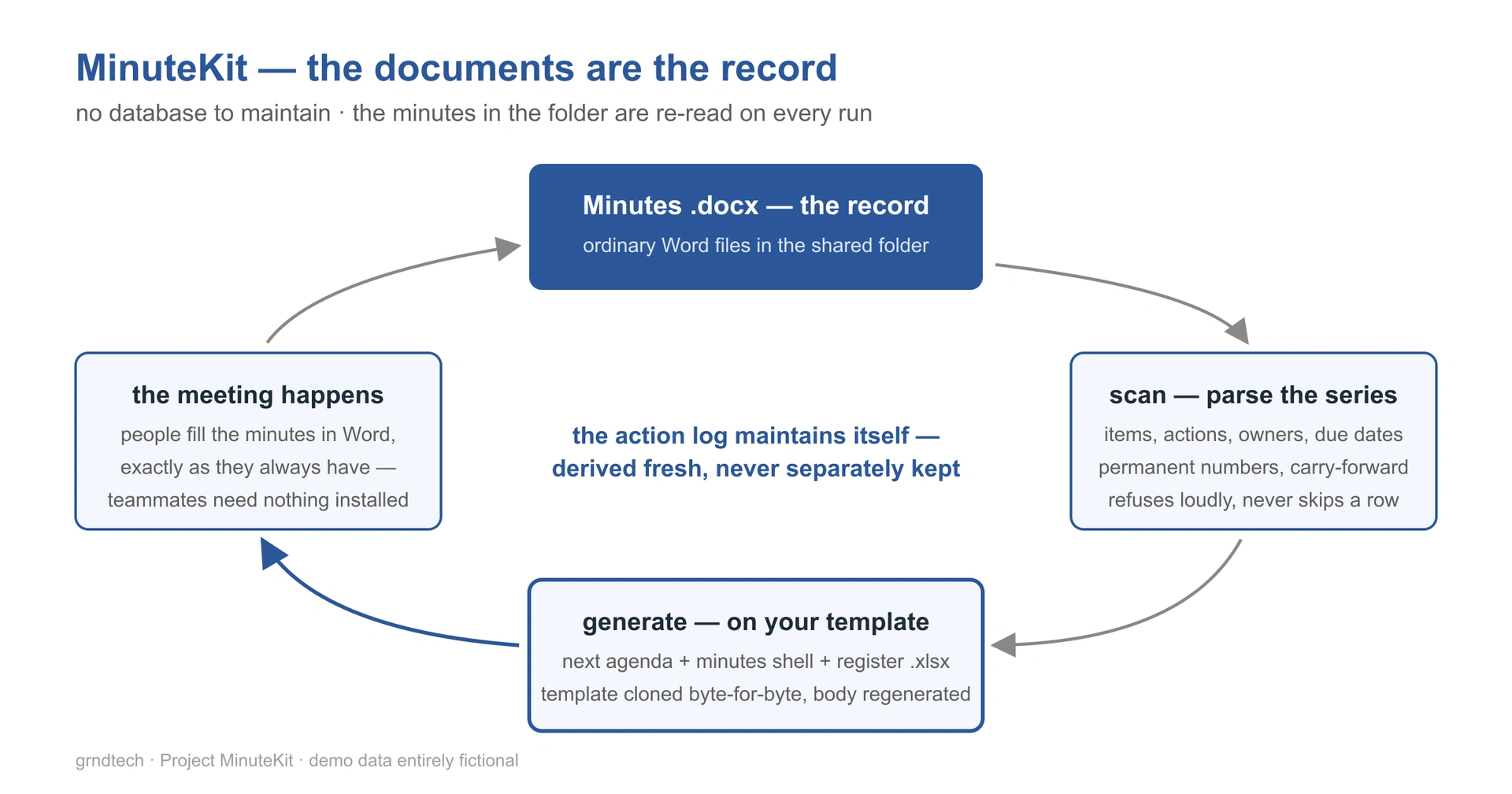
From that one decision, the capabilities follow:
- The action log maintains itself. The register is derived fresh from the minutes on every run — always current, never separately maintained. The high-maintenance-or-forgotten trade disappears, because there is nothing left to maintain.
- Agenda items get permanent numbers — and the script tracks them, not human memory. An item closes; its number retires with it. A reference to item 12 means item 12, forever, and nobody has to remember which numbers are taken.
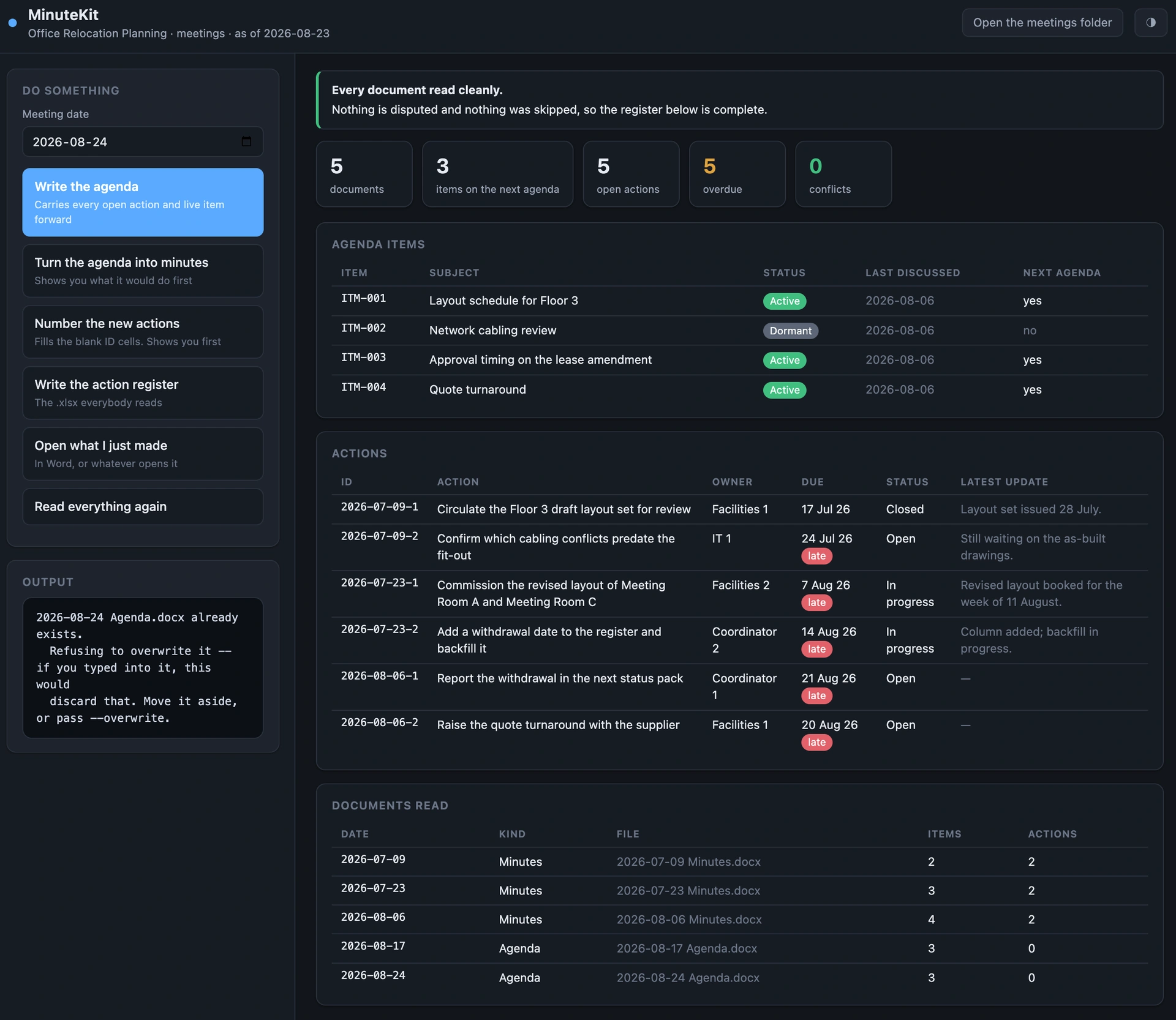
- Carry-forward is automatic. Open items and their actions — owner, due date, status — flow into the next agenda; overdue actions arrive flagged.
- It writes the next agenda and the minutes shell. One command produces the agenda for a date — carried items, open actions, continuing numbers — and a pre-filled minutes document ready for the meeting, both generated on the template.
- Renamed topics get caught. Two item titles that are really one topic reworded are flagged with both spellings, instead of silently forking the history.
- The register exports to Excel. Written by the same stdlib zip-and-XML technique PlanLink uses, because a
.docxand an.xlsxare the same kind of thing inside. - Teammates without the kit just keep using Word. The minutes are ordinary documents; anyone can read and edit them exactly as before — more clicks and typing, but zero interruption to the current workflow. One person running MinuteKit is enough for the whole series to stay tracked.
- Every document it writes matches your template exactly. The writer does the simplest thing that can possibly stay correct: it copies every file inside the template byte-for-byte and regenerates exactly one — the document body. Logo, headers, footers, styles, fonts can't drift, because nothing in the code knows what any of it is; placeholder tokens carry the content. That's the whole trick, and it's portable to any .docx workflow you have.
- It refuses rather than guesses. When a row doesn't parse, it names the file, the row, and what it expected — and stops. A register that goes quietly short looks fine from the outside; refusing loudly is what keeps the derived log trustworthy.
What this means in the AI-agent era
The docx reader and the template-cloning writer aren't one app's plumbing — they're toolbox pieces, and they make a point the PlanLink story made from the spreadsheet side: an AI agent is only as reliable as the tools it can call. An agent that has these produces a perfectly on-template document, deterministically, every time; an agent without them hallucinates XML or regenerates a fragile script on every run. The difference isn't the model — it's the toolbox. Generate a tool once, test it, keep it, and the agent you already have gets a little more reliable with every addition. The toolbox compounds.
Ship
MinuteKit is free and open source (Apache 2.0) at github.com/maxli552/minutekit — pure Python standard library, four actions — scan, agenda, minutes, register — behind the same kind of interface as PlanLink: a single HTML page in the browser, with the command line underneath for automation. It ships with a fictional three-meeting demo series that shows carry-forward, retired numbers, overdue actions and a deliberate topic clash in a single command. It's for anyone who runs a recurring meeting and keeps minutes in Word — which is most of the working world. Honest limitations: it is opinionated about the minutes structure (that's the point), your template needs the placeholder tokens described above, and it is not a task manager.
In production it turned twenty clerical minutes into seconds — and the action log has stayed current on its own ever since.
MinuteKit is provided as is, without warranty of any kind: test it against a copy of your own documents before you rely on it, and before any commercial use. It carries the structure of a meeting record, not its substance — the accuracy of the minutes remains with the person who signs them. See the terms of use.